The Salesforce Winter ‘26 release is here! There's a focus on reporting, admin productivity, smarter setup tools, and flow improvements, aimed at improving the configuration experience for Salesforce instances across the board. Depending on your instance, you'll be upgraded on one of the following dates:
- October 3, 2025
- October 10, 2025
If you want to find out exactly which weekend your Salesforce instance will be upgraded, head over to Salesforce Trust and click on ‘Maintenance.’ You’ll need to know which instance your org is running on, so to find out, go to your Setup menu and click on Company Information.
If you’d like a full run-through of the release, check out this Salesforce Help article for the breakdown.
1. Reference Line in Dashboard Charts
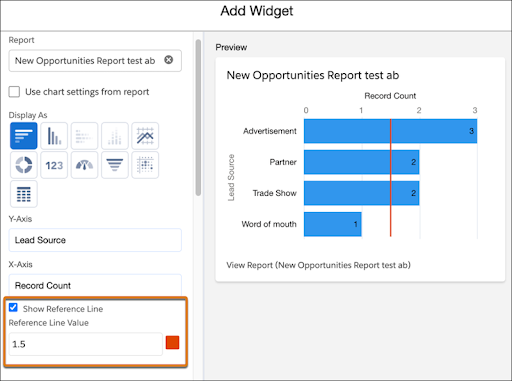
With Winter '26, dashboard charts now support reference lines! Just like in Reports, you can now set the value and pick a color. These visual markers help you easily compare performance against targets or thresholds, making them ideal for tracking sales goals, case resolution times, or any key metric that’s important to your team. Now your dashboard and report charts will match!
➡️ For technical details, see this link.
2. Type-Ahead Search in List Views
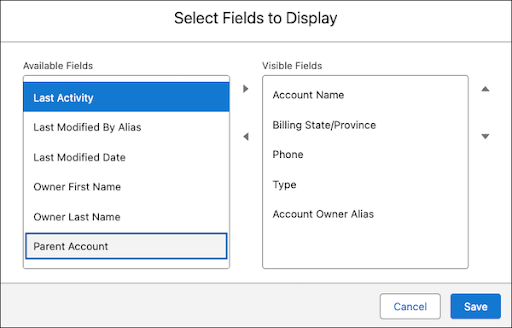
Prior to Winter ‘26, the ability to quickly search and jump to values with the help of your keyboard was not available when configuring List View columns, unlike other areas in Salesforce. Now you can easily ‘type ahead’ in the Available Fields and Visible Fields lists to streamline column configuration in your List Views and save on the tedious scrolling through field lists.
➡️ For technical details, see this link.
3. Sort List Views by Multiple Columns
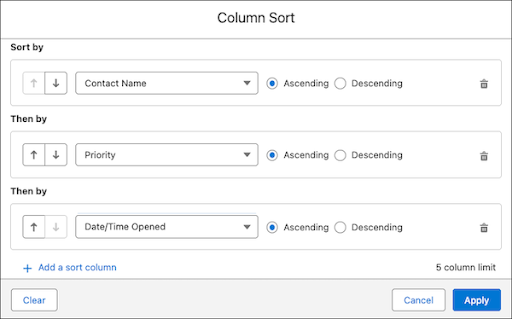
In addition to Type-Ahead search, Winter ‘26 makes multi-column sorting available to all users, allowing you to configure List Views to sort by multiple columns with custom priority.
➡️ For technical details, see this link.
4. Enhanced Field History Tracking in Setup
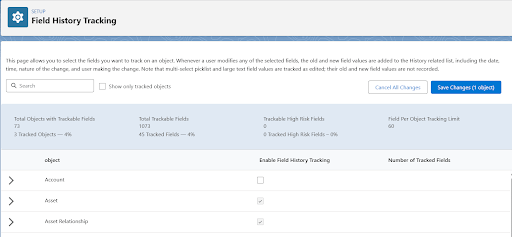
Winter ‘26 introduces a revamped Field History Tracking page within the Setup menu. This page offers a more organized and convenient way for admins to manage all aspects of field tracking in Salesforce.
➡️ For technical details, see this link.
5. Automatic Unassigning of Permission Set Licenses
No more frustration over app license limits due to forgotten manual Permission Set removals. In Winter ‘26, when you remove a Permission Set or Permission Set Group, the associated Permission Set License will be automatically revoked, preventing unnecessary license conflicts.
➡️ For technical details, see this link.
6. Improved Surveys for Better Customer Insights
Winter ‘26 brings improvements to surveys, including better handling of partially completed surveys, restrictions on multi-choice question selections, and the ability to translate Knowledge Feedback forms.
➡️ For technical details, see this link.
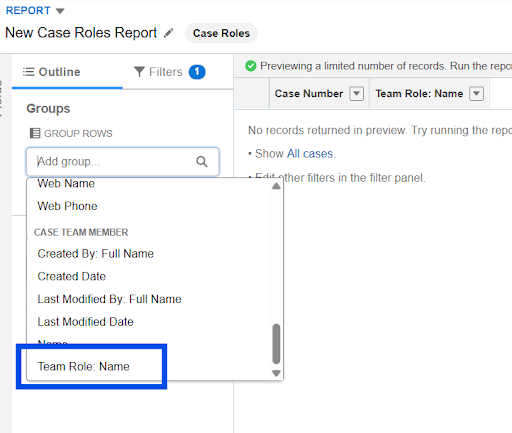
7. Gain Better Insights into Case Team Member Contributions by enabling role-based reporting
Create insightful service reports with the ability to enable role-based reporting, allowing you to track and report on the contributions of each team member.
➡️ For technical details, see this link.
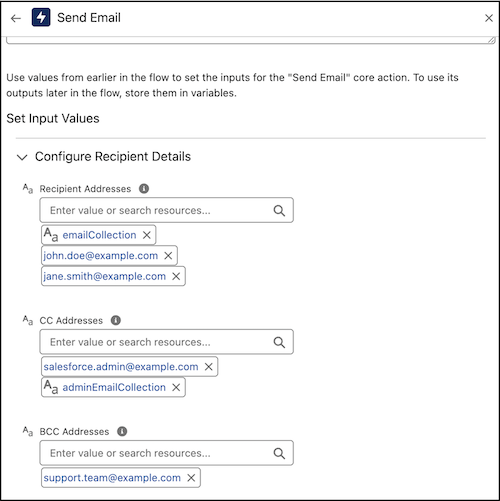
8. New Email Recipient Manager in Flows
The updated Send Email Flow Action lets you combine recipients from multiple sources, whether they’re individual users or collections, streamlining the email management process in Flows.
➡️ For technical details, see this link.
Summary
Many of the features mentioned in this blog require some background knowledge of Salesforce Administration and how to configure an environment. As always if you need any assistance applying these improvements and tools to your system, don’t hesitate to reach out. We hope you enjoy exploring all the new functionality available in the Salesforce Winter ‘26 release.