In this Salesforce Winter ’27 release highlights article, we cover:
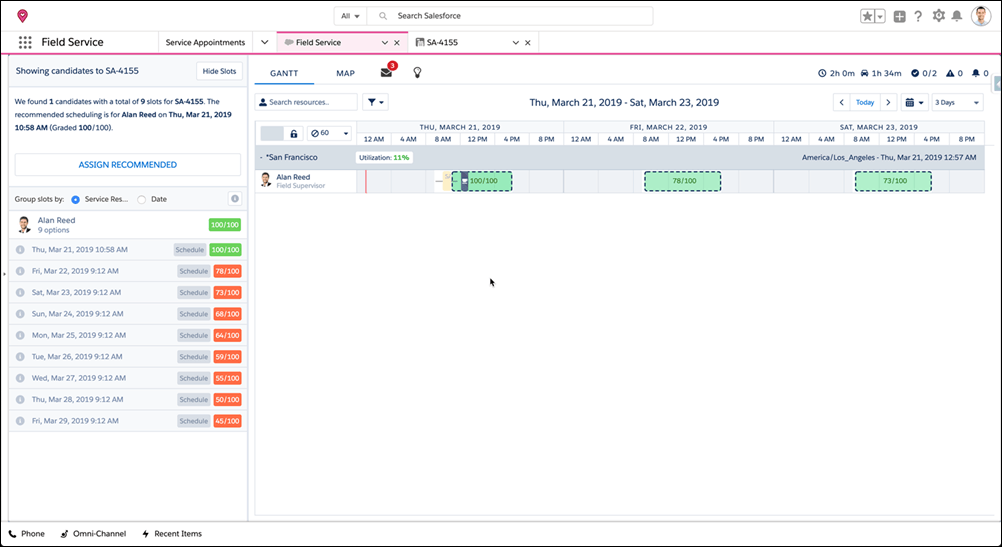
Field Service: Schedule and optimise multiday service appointments, including jobs with specific arrival windows.
Flow: Run Screen Flows across multiple records, test Flows with Test Mode and Mock Outputs, create simpler branching, manage Flow libraries, capture time on screens, and explore a range of additional Flow Builder, testing, runtime and security improvements.
Service Cloud: Delete outdated Case Milestones and keep customers informed when messaging conversations are rerouted.
Sales Cloud: Improve sales coaching with Call Coaching, AI-suggested next steps, post-meeting voice notes, and updates to Relationship Maps and pipeline insights.
Agentforce Nonprofit: Automate household creation and naming for fundraising.
The Salesforce Winter ’27 release is here, and we’ve picked out some of our favourite updates from this release. There’s a strong focus on AI and Agentforce, Flow improvements, and enhancements across Salesforce’s setup and configuration tools, with plenty of practical changes worth exploring.
Depending on your Salesforce instance, you’ll be upgraded on one of the following dates:
4 September 2026
2 October 2026
9 October 2026
If you want to find out exactly which weekend your Salesforce instance will be upgraded, head over to Salesforce Trust and click on ‘Maintenance.’ You’ll need to know which instance your org is running on, so to find out, go to your Setup menu and click on Company Information.
Field Service: Schedule and Optimise Multiday Service Appointments
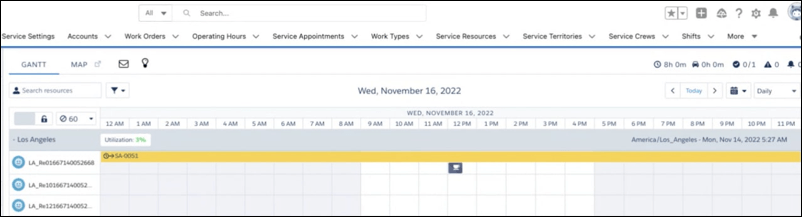
Planning a field service job that takes more than one day is now easier. Salesforce Field Service can schedule and optimise multiday service appointments, including jobs with specific arrival windows. The optimisation engine can also move these appointments when adjusting the schedule, helping teams make better use of technician time and reduce unnecessary travel.
Before planning around this update, there are two things to keep in mind. The optimisation behaviour needs to be configured — it won’t be available automatically after the upgrade. Also, the scheduling search looks 30 days ahead, so a multiday appointment must fit entirely within that window to appear as an available slot.
Run Screen Flows on Multiple Records from List Views and Related Lists
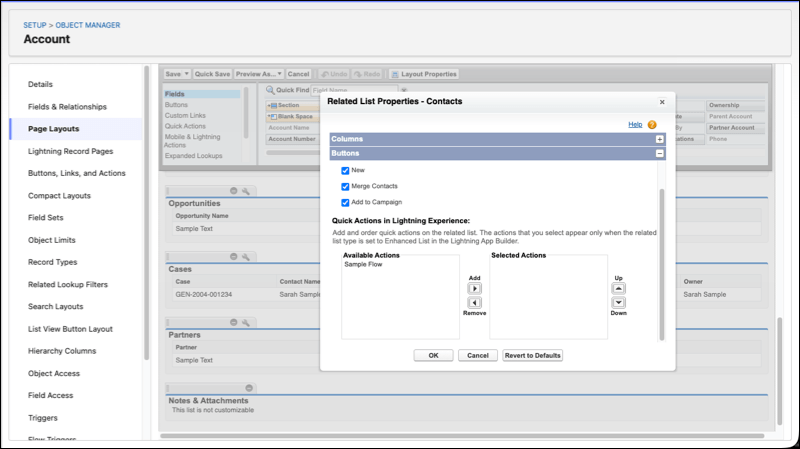
Screen Flows are no longer limited to working with one record at a time. With this update, you can launch a Screen Flow from a list view or related list, select the records you want to work with, and complete the action from a single window. Up to 2,000 records can be selected at once.
This is a useful change for those repetitive bulk tasks that can otherwise take a lot of clicking. Admins can also set it up using Salesforce’s standard configuration tools, without needing custom Apex or Visualforce.
Test Your Salesforce Flows with Flow Test Mode (Beta)
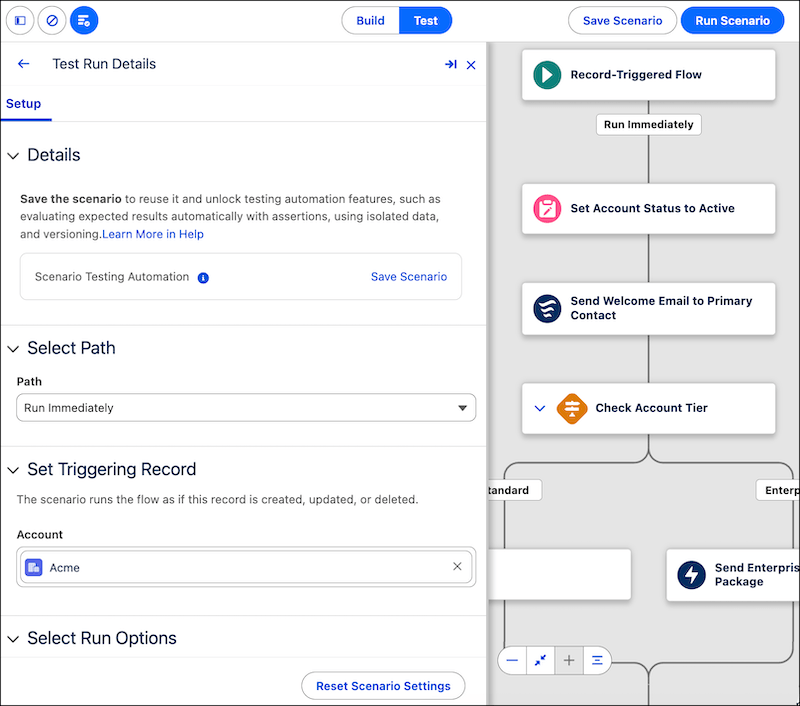
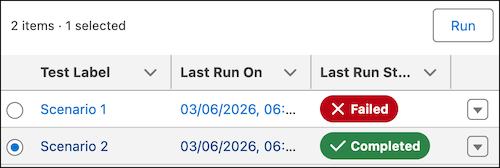
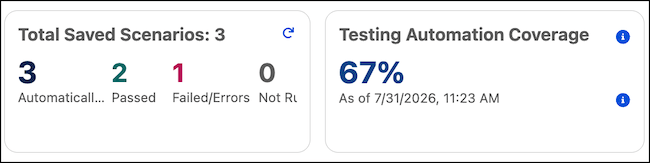
Flow Builder now has a dedicated Test mode, giving you a place to configure inputs, define expected results and save reusable test scenarios. You can create different scenarios for different Flow paths and re-run them with one click whenever the Flow changes. You can also run tests using isolated test data, so they don’t have to rely on your org’s existing data.
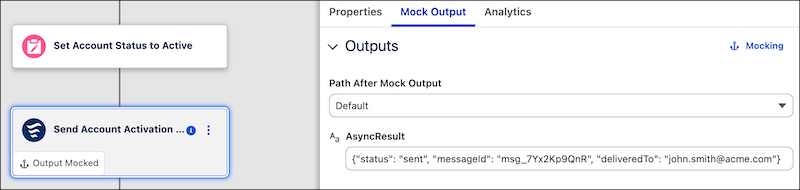
There’s also Mock Outputs (Beta) for Action and Subflow elements, which lets you test different results without making a live callout or running the subflow. Both features are still in Beta, so they’re worth exploring on internal work first.
Simpler Flow Branching with Split by Field Value and Split by Date
Two new Flow elements make it easier to create paths based on a field or date. Split by Field Value lets you branch a Flow based on the value of a field, while Split by Date lets you create paths based on whether a date is before, between, after or on a specific date.
You could already do this with a Decision element, but these new options take fewer clicks to set up and keep the Flow canvas easier to follow. That can make a big difference when someone else needs to pick up and maintain the Flow later.
Keep Your Salesforce Flow Library Organised and Easier to Manage
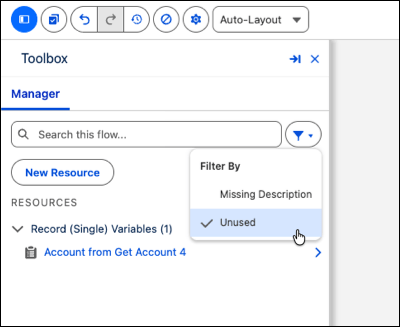
As your Flow library grows, two new updates can make it easier to keep things organised. The new Unused filter helps you find resources that are no longer being used, and Version Edit History shows who changed a Flow and what was changed.
Together, these tools make it easier to clean up existing Flows and understand how they’ve evolved over time. They could be particularly useful when taking over an org built by another partner, where a little more visibility can make the discovery process much easier.
Capture Time Directly with the New Flow Screen Component
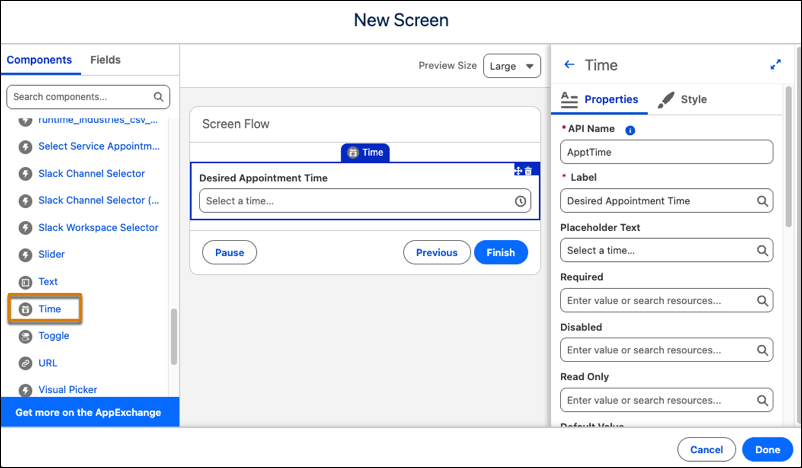
Adding a time to a Flow screen is now much simpler. The new Time screen component lets users enter a time directly, while builders can set the allowed time range, choose the interval and add a custom error message for values outside that range.
It’s a small change, but a useful one for things like appointment bookings, service scheduling and intake forms where capturing an exact time matters.
Service Cloud: Clean Up Case Milestones and Keep Customers Informed When Chats Are Rerouted
Service Cloud gets two practical updates for case and messaging management. Case Milestones can now be deleted, either in bulk through Data Loader or programmatically with Apex, making it easier to remove outdated milestone records that are no longer relevant.
You can also send a customised auto-response when a messaging conversation is rerouted to another Service rep or queue. This gives customers some context during the handover, rather than leaving them wondering whether their conversation has been disconnected or ignored.
Sales Cloud: Coach Reps Consistently with Call Coaching and AI-Suggested Next Steps
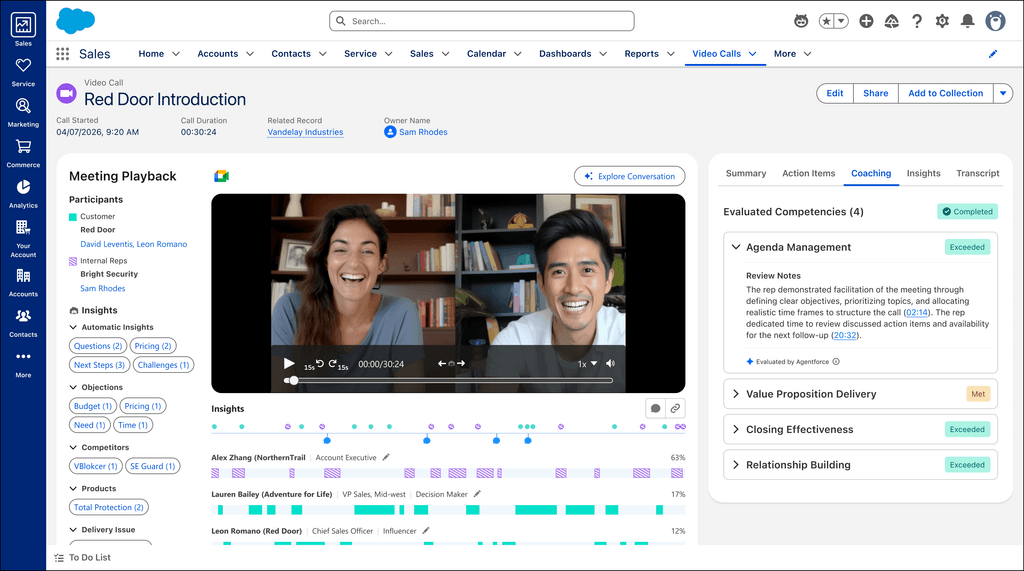
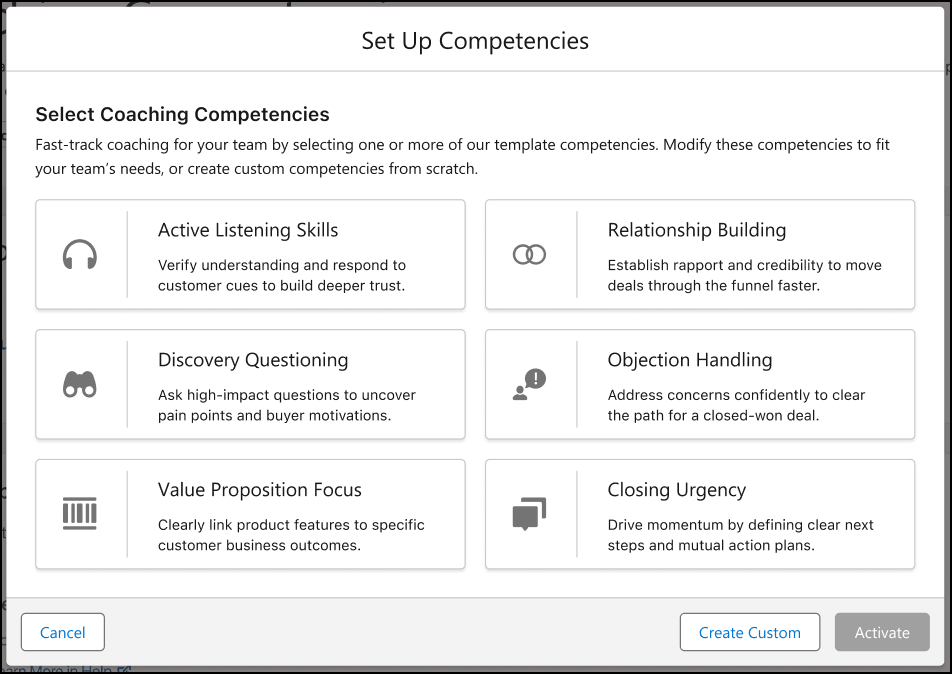
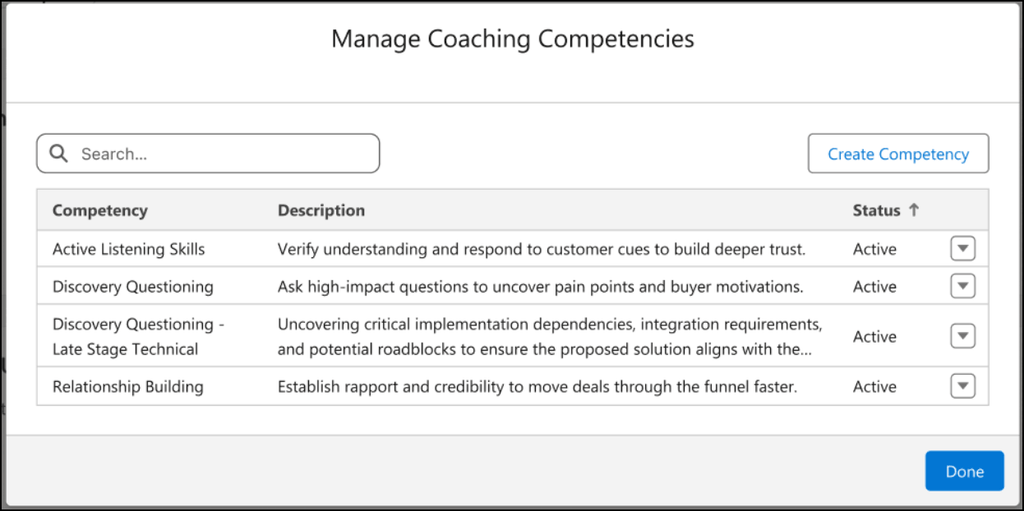
Sales teams can define the competencies that matter to them and see how reps perform against them, with ratings and notes available directly from the Coaching tab on video call records. This provides a more consistent way to coach reps across customer conversations, rather than relying on what each manager happens to focus on.
For teams with Einstein Conversation Insights and the Salesforce mobile app, reps can also receive AI-generated suggested next steps once a meeting transcript is available, and capture a post-meeting voice note instead of typing one up. Winter ’27 also brings improvements to Relationship Maps and pipeline insights.
Agentforce Nonprofit: Automate Household Creation and Naming
Two related Fundraising updates can take some of the manual work out of managing donor households. When entering a gift for a Person Account donor, users can select Auto Create Household, and Salesforce will create a household if one doesn’t already exist. The same behaviour is available through the /gifts and /commitments APIs.
Admins can also define formulas for household names and greetings, which Salesforce automatically recalculates when household membership or member details change. Households can be created directly from the Gift Entry Grid or through the Business Process API, reducing the need for separate automation to create and maintain them.
Alongside the larger Flow updates covered above, Winter ’27 also brings a range of smaller improvements to the Flow Builder experience, testing and runtime behaviour.
A More Customisable Flow Builder
Customise the Flow Builder Workspace — A new setting lets builders hide API names, collapse labels and descriptions, and hide labels and descriptions after setup.
Modernised Flow Builder Canvas — The canvas gets a refreshed Cosmos theme, smaller element cards and a simpler End element icon. It also follows the org’s active theme.
Save-Time Validation — Flow Builder now warns you when you save if an Assignment element sets a fixed text value that is longer than the target field allows, or if a Create Records element using a record variable is missing a required field assignment. These issues were previously only discovered at run time. The field-length check applies to fixed text only, not dynamic variable references.
Automatic retries for record lock contention — If a Flow hits a record lock during transaction initialisation, it now waits 10 seconds and retries instead of failing with UNABLE_TO_LOCK_ROW. This changes the transaction duration, so it’s worth testing before enabling.
Decision and Keyboard Navigation — Decision elements now include path highlighting, resizable property panels and inline path renaming. You can double-click a path name on the canvas to rename it. The auto-layout canvas can also be navigated using arrow keys, including across branches and fault paths, with standard cut, copy and paste shortcuts.
Flow Version Comparison — Element name labels in the comparison table are now clickable and open a resizable side panel showing the full change record. Version dropdowns now list versions in chronological order, and comparisons also support Data 360-triggered and Agentforce Marketing Flows.
User Context - Enforces User Permissions — A new runtime setting can strictly enforce the running user’s object permissions, field-level security and sharing rules, regardless of how the Flow was launched.
AI-Generated Flow Tests — Agentforce for Flow Headless can draft Flow test scenarios covering success, fault and edge-case paths from a prompt. After you approve the proposed scenarios, it builds, validates and runs the tests.
Isolated Test Data for Flow Tests — If Test Mode (Beta) is enabled, you can also use a prompt to create isolated test data for your Flow tests, separate from your existing org data.
Request Approvals Component — Add the component to Lightning record pages or Experience Builder sites, allowing users to choose from up to 10 autolaunched approval processes when submitting a record.
Automatically Open Next Work Item — The Orchestration Work Guide can now automatically open the next work item.
Dedicated Record-Change Event Channel — Salesforce now routes record-change events through a dedicated channel, so bulk data loads no longer stall running approval processes.
End Elements Saved to Metadata — Auto-layout Flows now save End elements explicitly in the Flow metadata, so the canvas layout no longer reshuffles when the Flow is reopened. This can change the source-control diff without changing the Flow’s logic.
Many of the features mentioned in this blog require some background knowledge of Salesforce Administration and how to configure an environment. As always if you need any assistance applying these improvements and tools to your system, don’t hesitate to reach out. We hope you enjoy exploring all the new functionality available in the Salesforce Winter ‘27 release.
Summary Turning the Zendesk Sell Retirement Into an Opportunity The announcement is official: Zendesk Sell is retiring. Many businesses rightly worry about potential downtime, pipeline disruptions, and a complex migration process. However, finding a Zendesk Sell alternative shouldn't just be about finding a like-for-like replacement with the exact same limitations you currently have. Instead, this […]
It’s that time again - Summer has bloomed for our northern hemisphere neighbours, and so have the latest Salesforce updates! We’ve dug through the Summer ‘26 release notes and handpicked the most exciting features for business users and admins. Check out our latest blog, where we break down the highlights and what they mean for […]
The Salesforce Summer ‘26 release is here, and it's a significant one! There is a strong focus on AI-powered automation, enhanced service capabilities, deeper Slack integration, and platform security improvements, all aimed at improving how organisations build, manage, and secure their Salesforce environments. Depending on your instance, you'll be upgraded on one of the following […]
In the spirit of reconciliation Enrite Solutions acknowledges the Traditional Custodians of Country throughout Australia and their connections to land, sea and community. We pay our respect to their Elders past and present and extend that respect to all Aboriginal and Torres Strait Islander peoples today.